
• Skip to primary navigation
  • Skip to main content
  • Skip to primary sidebar
  • Skip to footer

03 9872 2999

Send us a message

  • Facebook
  • LinkedIn
  • Twitter
  • YouTube
CommsPlus Distribution

CommsPlus Distribution

Your unified communications distribution partner

  • Vendors
    • Avaya
    • Access4
    • AVer
    • Yeastar
    • Captivate Connect
    • NEC
    • Yealink
    • Grandstream
    • Call2Teams
    • Netgear
    • HP Poly
    • DTEN
    • Tollring
    • EnGenius
    • Gigaset
    • EPOS
    • Panasonic
    • Fanvil
    • Heckler
    • Snom
  • Services
  • Company
    • About Us
    • Privacy Policy
    • Warranty
    • Returns
    • News
    • Contact Us
  • PRC
  • Shop
  • Become a Partner

Choosing A VoIP Phone – Part 2: IP Handsets

Learn what are the key features of IP handsets and when to choose them for your business.

Home / Resources / Guides / Choosing A VoIP Phone – Part 2: IP Handsets

January 20, 2020 by Hasan Tariq

IP Handsets look very similar to a standard, physical desk phone.
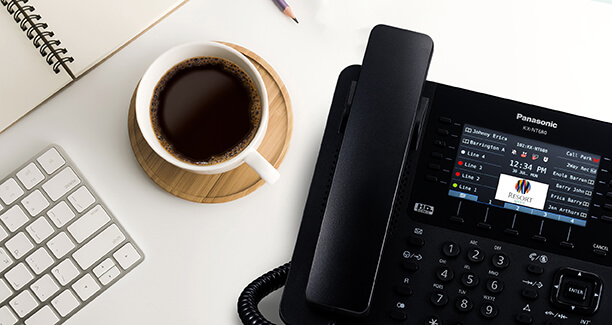
Top features include:

  • Line key appearance
  • Busy lamp fields that display other users who are busy on the phone
  • Easy hold and transfer capabilities

This type of handset has been around for a long time and has evolved in to an extremely functional business communication device.
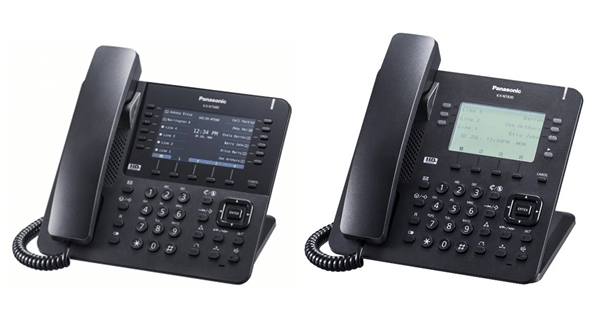
IP handsets often mimic traditional digital handsets.

This is because PBX suppliers have spent the last 15 years refining the product and feature set that users want. The VoIP handset just enhances this to a whole new level.

To move a phone all that is required is a data point and a free port on the local PoE switch. The phone extension number is tied to the device, not to the port as in traditional legacy systems.

This way the tyranny of distance which was always an issue on campus type environments is largely negated. Administration expenses are halved.

The latest IP handsets no longer require you to be stuck office bound!

These will work over any decent internet connection. No private networks required. You can now have remote offices and users working just as efficiently as they would be inside the work place.

What’s more, integration into any CRM through CTI interfaces is available at the same time as all other inter-office users.

IP handsets have been proven over time and are simple to use.

However they are aimed primarily at a desk-bound user. The key thing to look for here is buttons.

The remote/campus user cannot see who is doing what in the office by looking around. Therefore her dependency on buttons to see who is busy on the phone and who is not is immense.

Continue on the next part of this series to learn about another type of VoIP phone: PC-Based Soft Phones.

Continue to part 3

Business VoIP Series – Part 3: Softphones


In this series

Business VoIP Series – Part 1: Questions to Ask
Business VoIP Series – Part 2: IP Handsets
Business VoIP Series – Part 3: Softphones
Business VoIP Series – Part 4: Smartphone Apps
Business VoIP Series – Part 5: Wireless IP DECT Phones
Business VoIP Series – Part 6: WIP Phones
Business VoIP Series – Part 7: Conclusion

Category iconGuides

Subscribe for Offers and Updates

Get the latest updates from CommsPlus delivered straight to your inbox.

Primary Sidebar

Become A Partner Today

Complete our simple online form to become a CommsPlus Partner.

Partner Application Form

Footer

Contact us

Unit 19, 114-118 Merrindale Drive
Croydon VIC 3136
Australia

03 9872 2999

Send us a message

Vendors

  • Avaya
  • Access4
  • NEC
  • Yealink Backup
  • AVer
  • See All Vendors

Company

  • About Us
  • Products
  • Professional Services
  • Partners
  • Privacy Policy
  • Warranty

Subscribe for Offers and Updates

  • Facebook
  • LinkedIn
  • Twitter
  • YouTube

Copyright © 2025 CommsPlus Distribution. All rights reserved.